
Live preview
Original and new names sit side by side. Nothing changes until you click Rename.
RenameStudio for Mac
Preview every new name, catch conflicts, and rename files and folders on your Mac. Your files stay on this computer.
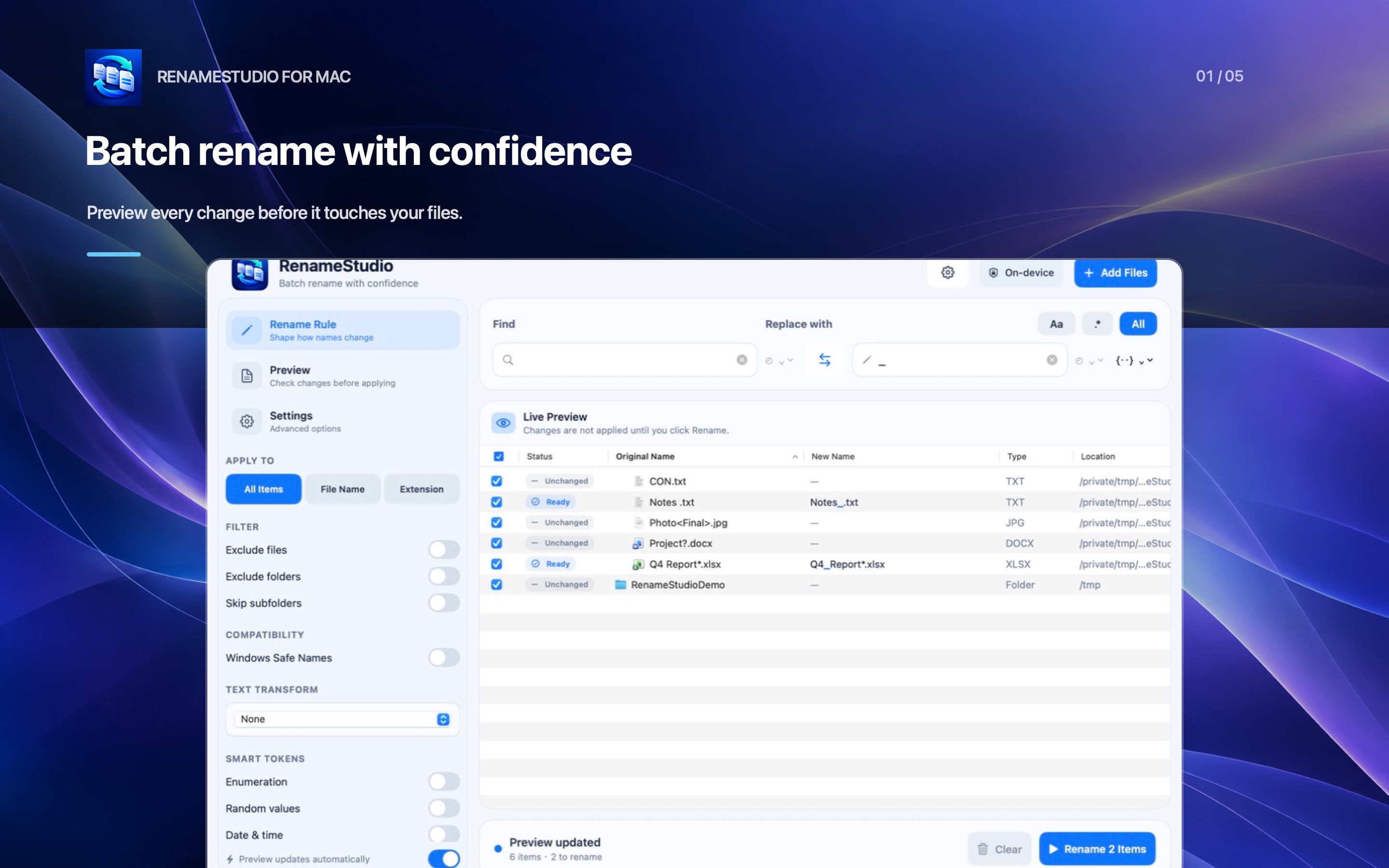
Build a rule, read the preview, and apply the batch only when the names look right.
Original and new names sit side by side. Nothing changes until you click Rename.
Find characters Windows rejects, reserved names such as CON and LPT1, and names that end in a space or period. Approve the suggested fix in one click.
Find and replace plain text or regular expressions. Change the full name, the filename, or only the extension. Add case changes, counters, random values, UUIDs, and dates.
When you ask for it, use EXIF and XMP/IPTC details from the photos you select, including camera, date taken, and location stored in the file.
Invalid names, duplicate targets, existing files, and names that are too long are flagged before the batch runs. Leave any row out.
No account, no ads, no analytics, and no server. Command-Z undoes the last successful batch.
Choose them in the open panel, or drop them in from Finder.
Write a find-and-replace rule. The preview updates as you type.
Apply the batch. If you change your mind, undo the last successful one.
RenameStudio is sandboxed and has no network access. It can read and rename only the files you choose, and only on this Mac.